Your Questions, Answered
We’ve assembled the most frequently asked questions about Eversense into one place. Got a question that you can’t find the answer to? Contact us.
Events can be added later from the MY GLUCOSE screen with a single tap anywhere on the graph area. You will be able to adjust the date and time of the event.
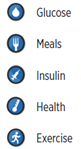
You can also add Notes to each of the Event types if there is additional information you would like to include.
NOTE: The Notes that are added in the App are not viewable in DMS. The notes are only available in the App.
The Smart Transmitter sends glucose data via Bluetooth® to your mobile device running the Eversense® App.
A certified health care professional will explain and perform the simple and quick steps to insert the sensor. You will be fully awake during the approximately 5-minute insertion procedure. (The entire procedure, including preparation, usually takes about 15 minutes.)
It is important to choose a site (on the upper arm) that is comfortable for you to wear the sensor and smart transmitter for up to 365 days. It is recommended to have the sensor inserted toward the back of the upper arm. Placement in this area minimizes the chance of the sensor and smart transmitter being bumped by doorways, walls or other narrow passages. It is recommended to avoid areas with loose skin, scars, tattoos, nerves, or blood vessels that could be incised during the procedure. It is recommended to alternate arms for subsequent insertion sites.
Step 1: Site preparation – the insertion site will be cleaned, disinfected, then anesthetized using lidocaine.
Step 2: Incision – a small (less than 1 centimeter) incision will be made at the insertion site.
Step 3: Sensor insertion – a subcutaneous pocket will be created under the skin and the sensor will be inserted in this pocket.
Step 4: Site closure – the incision will be closed with Steri-Strips™. Sutures are not usually required.
Step 5: Sensor and smart transmitter linking – link the sensor and smart transmitter to begin the 24-hour Warm-Up Phase.
Note: After insertion, link the smart transmitter and the sensor and then allow the incision site to heal 24 hours before wearing the transmitter.
The sensor requires 24 hours to stabilize within the insertion site, this period is known as the Warm-up Phase. After the first 24 hours of sensor insertion, position and secure the smart transmitter over the sensor on top of the Tegaderm® and ensure you have a connection. Then you can perform your Initialization Phase calibration of 4 fingerstick blood glucose tests to start getting glucose readings.
During the first few days after insertion, you will wear the smart transmitter over the Tegaderm. Leave the Tegaderm in place for as long as your health care provider instructs.
The system is indicated (approved) for use to replace fingerstick blood glucose measurements for diabetes treatment decisions.
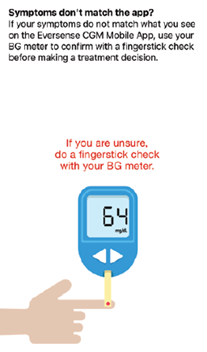
Pay close attention to your glucose values, symptoms, and trends. If your symptoms are different than the sensor glucose values or what the alert indicates, confirm your glucose value with a blood glucose meter test before making a treatment decision.*
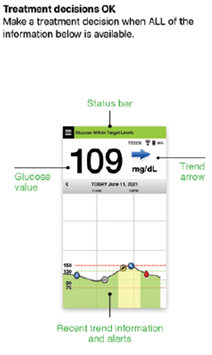
To make a treatment decision, the user should consider:
- Status bar information.
- Current sensor glucose value – the current glucose value should be displayed in black.
- Trend arrow – a trend arrow should be displayed.
- Recent trend information and alerts.
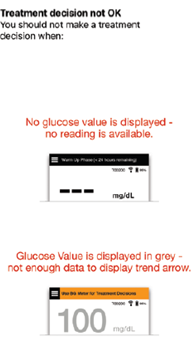
When to NOT make a treatment decision:
- No glucose value is displayed.
- No trend arrow is displayed.
- Your symptoms do not match the glucose information displayed.
- The current sensor glucose value is displayed in grey.
- The status bar is displayed in orange.
- You are taking medications of the tetracycline class.
* If you have any uncertainly in how or when to make treatment decisions, always speak with your healthcare professional.
Note: Always refer to the glucose information on your Eversense 365 App on your smartphone to make treatment decisions. Do not use a secondary display like the Apple Watch or Eversense NOW App.
Eversense® 365 is a continuous glucose monitoring system indicated for continually measuring glucose levels for up to 1 year in people (18 years or older) with diabetes. The system is indicated for use to replace fingerstick blood glucose measurements for diabetes treatment decisions.
The system is intended to:
- Provide real-time glucose readings.
- Provide glucose trend information.
- Provide alerts for the detection and prediction of episodes of low blood glucose (hypoglycemia) and high blood glucose (hyperglycemia).
The system is intended for single patient use and requires a prescription. Historical data from the system can be interpreted to aid in providing therapy adjustments. These adjustments should be based on patterns and trends seen over time.
The Eversense 365 CGM System is also intended to autonomously communicate with digitally connected devices, including automated insulin dosing (AID) systems. The Eversense 365 CGM System can be used alone or in conjunction with these digitally connected medical devices for the purpose of managing diabetes.
The system is intended for single patient use and requires a prescription.
Still have questions?
The Eversense team is dedicated and ready to provide the answers and support you need. Simply click the link below.
The Eversense® 365 Continuous Glucose Monitoring (CGM) System is indicated for continually measuring glucose levels for up to one year in people (18 years and older) with diabetes. The system is indicated for use to replace fingerstick blood glucose (BG) measurements for diabetes treatment decisions. Fingerstick BG measurements are required for calibration one time a week after day 13, and when symptoms do not match CGM information or when taking medications of the tetracycline class. The sensor insertion and removal procedures are performed by a health care provider. The Eversense 365 CGM System is a prescription device; patients should talk to their health care provider to learn more.
For important safety information, see bit.ly/eversensesafety
Eversense, Eversense 365 Continuous Glucose Monitoring, and the Eversense logo are trademarks of Senseonics, Incorporated. All other trademarks are properties of their respective owners and are used solely for informative purposes. No relationship or endorsement should be inferred or implied.
Apple Watch® is a product of Apple, Inc., and may be separately purchased from an authorized Apple retailer. Apple Watch is not included with the Eversense CGM System. Android is a trademark of Google LLC.
MKT-001692 Rev 1


 Call My Eversense Specialist Now
 Schedule a Call